












SysInfo EPUB Converter Tool for Windows
- Demo
- 4.5
- V26.0.5
Download for Windows
View an ad to download for free
Best EPUB Converter for Windows PC
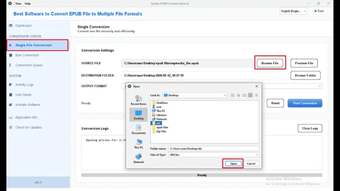
SysInfo EPUB Converter is a professional eBook conversion tool designed to convert EPUB files into multiple widely supported document and image formats with high accuracy. The software enables users to export EPUB eBooks to PDF, DOC, DOCX, TXT, HTML, JPG, PNG, BMP, TIFF, GIF, and other formats while preserving the original text, formatting, images, hyperlinks, and layout. It is an ideal solution for students, publishers, educators, researchers, and professionals who need to access EPUB files across different platforms and devices.
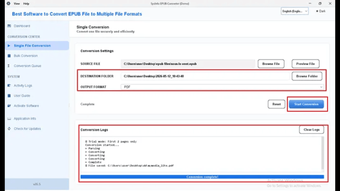
The software supports batch conversion, allowing users to convert multiple EPUB files simultaneously, which saves time and improves productivity. Advanced features include file preview, password protection for output PDF files, custom page size settings, destination folder selection, and flexible export options. The intuitive interface ensures a smooth conversion experience for both beginners and advanced users.
SysInfo EPUB Converter maintains complete data integrity throughout the conversion process by preserving fonts, formatting, images, tables, and hyperlinks. It supports all major EPUB versions and is fully compatible with Windows 11, 10, 8, 7, and earlier editions. Whether you want to edit eBooks, create PDFs, archive digital books, or convert EPUB files into image formats, the software delivers fast, secure, and reliable performance.
Key Features
Convert EPUB files to PDF, DOC, DOCX, TXT, HTML, JPG, PNG, BMP, TIFF, GIF, and more.
Batch convert multiple EPUB files in a single operation.
Preserve original formatting, images, hyperlinks, and layout.
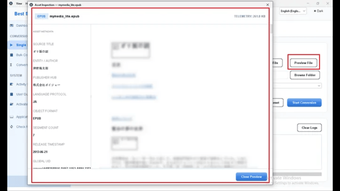
Preview EPUB files before conversion.
Password-protect output PDF documents.
Customize page size and output location.
High-speed conversion with complete data accuracy.
Supports all EPUB versions.
Compatible with Windows 11, 10, 8, 7, and earlier.
Why Choose SysInfo EPUB Converter?
SysInfo EPUB Converter offers a secure, fast, and efficient way to convert EPUB eBooks into editable documents, PDFs, and image formats without compromising quality. Whether you're sharing eBooks, editing content, creating backups, or improving file compatibility, it provides a reliable solution for personal, educational, and business use.
Loading…
App specs
License
Demo
Version
26.0.5
Latest update
Platform
Windows
OS
Windows 95
Language
English
Size
242.56 MB
Developer
- SysInfoTools
- More programs (15)
Program available in other languages
SysInfo EPUB Converter Tool for PC
- Demo
- 4.5
- V26.0.5
Download for PC
View an ad to download for free
User reviews about SysInfo EPUB Converter Tool
Have you tried SysInfo EPUB Converter Tool? Be the first to leave your opinion!
Add reviewTop downloads Utilities & Tools for Windows
Top downloads Utilities & Tools for Windows
Top downloads Utilities & Tools for Windows
Related topics about SysInfo EPUB Converter Tool
Latest articles

Sony secures PS5 memory through March 2027 amid supply squeeze

The One Ring gets The White Tower & Hall of Gold: one of its biggest expansions yet

OnePlus 16 teaser is here: major gaming upgrades ahead of launch

Australia hasn’t banned social media for under-16s yet: what’s actually being proposed

Samsung and SK Hynix push long-term memory deals: pressure for PC buyers
Laws concerning the use of this software vary from country to country. We do not encourage or condone the use of this program if it is in violation of these laws. Softonic may receive a referral fee if you click or buy any of the products featured here.